
Spring Boot 4 Redis MySQL实现OAuth2 OpenID Connect(OIDC)服务器端,使用Redis存储同意,授权信息,使用MySQL存储Clinet
演示:https://img.makesong.cn/20251226.mp4
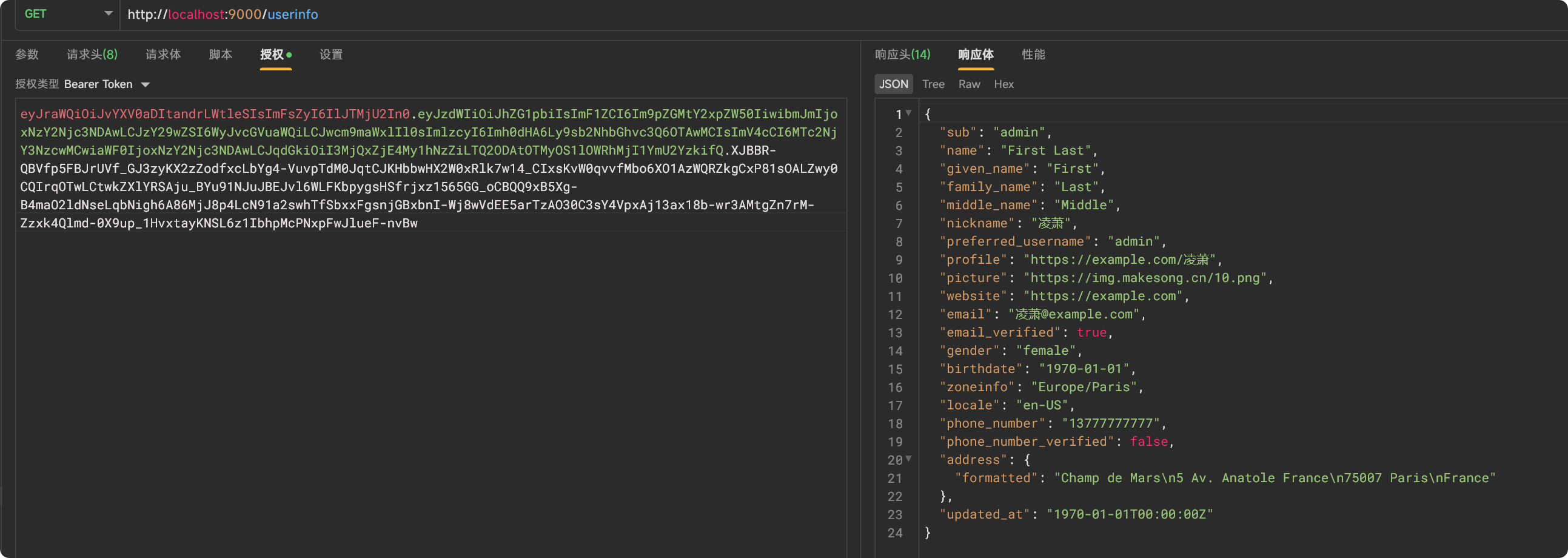
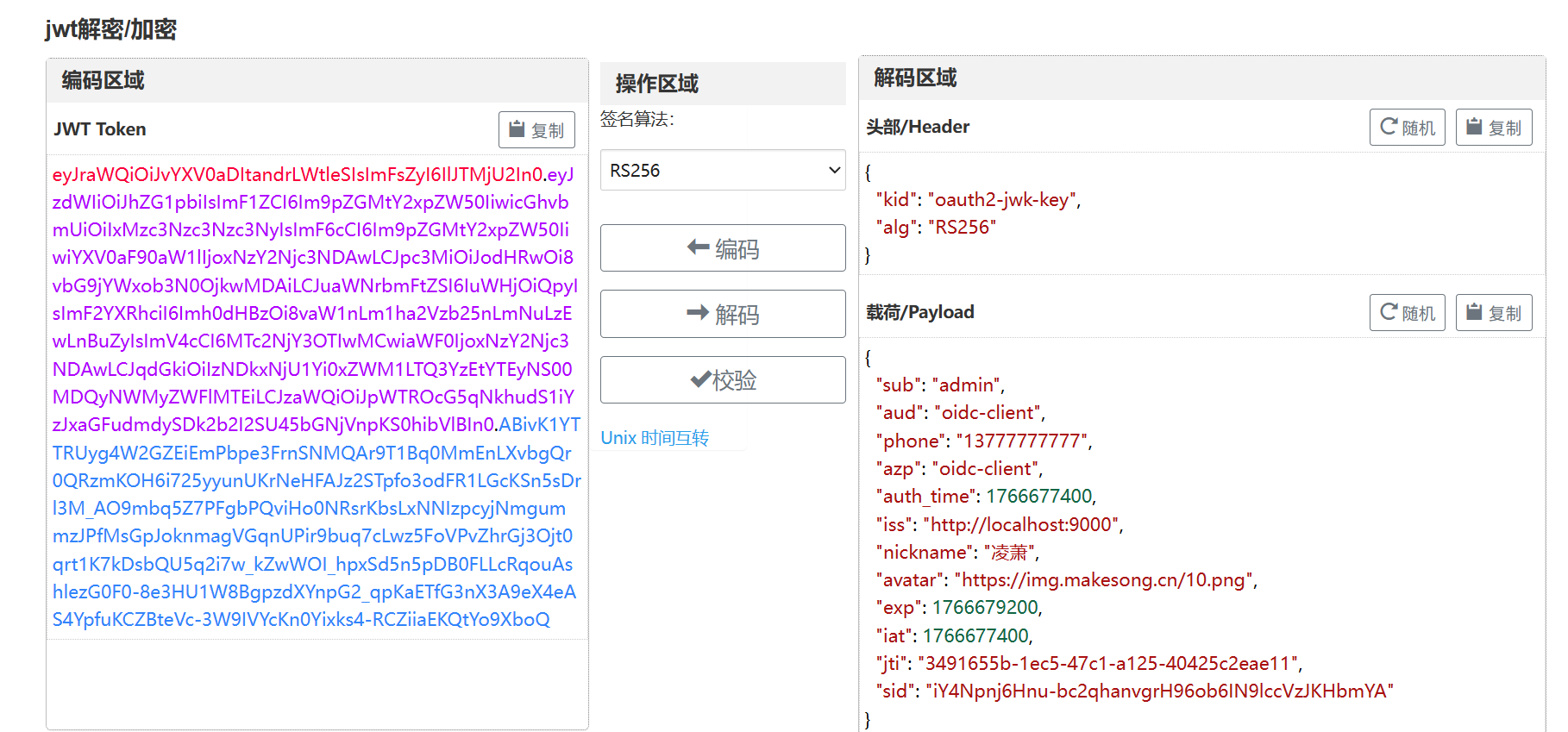
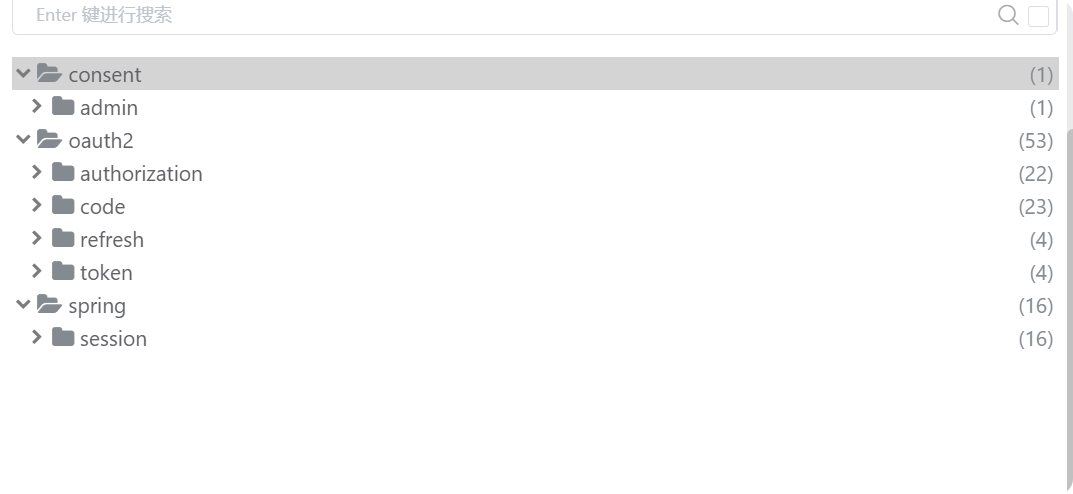
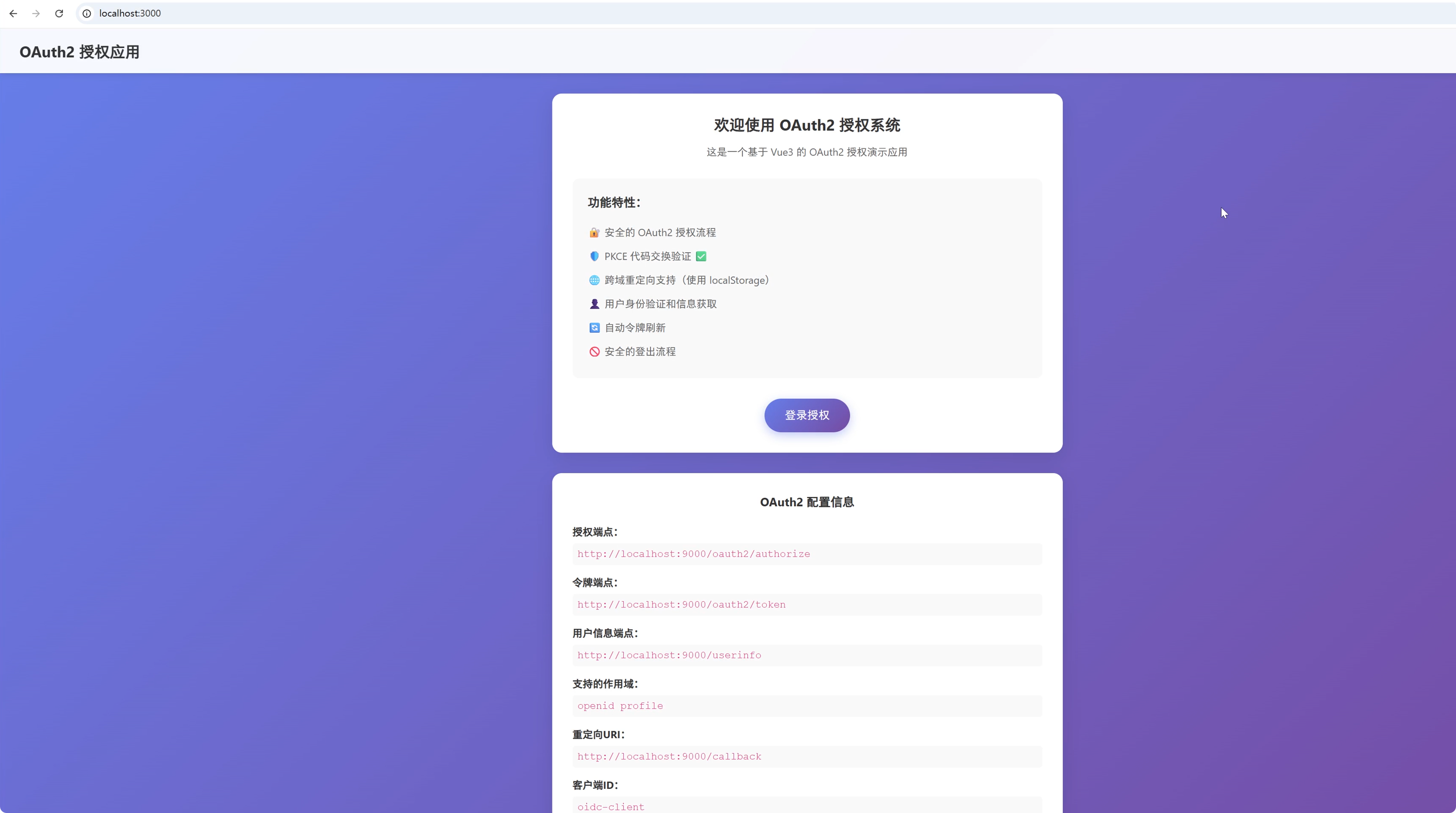
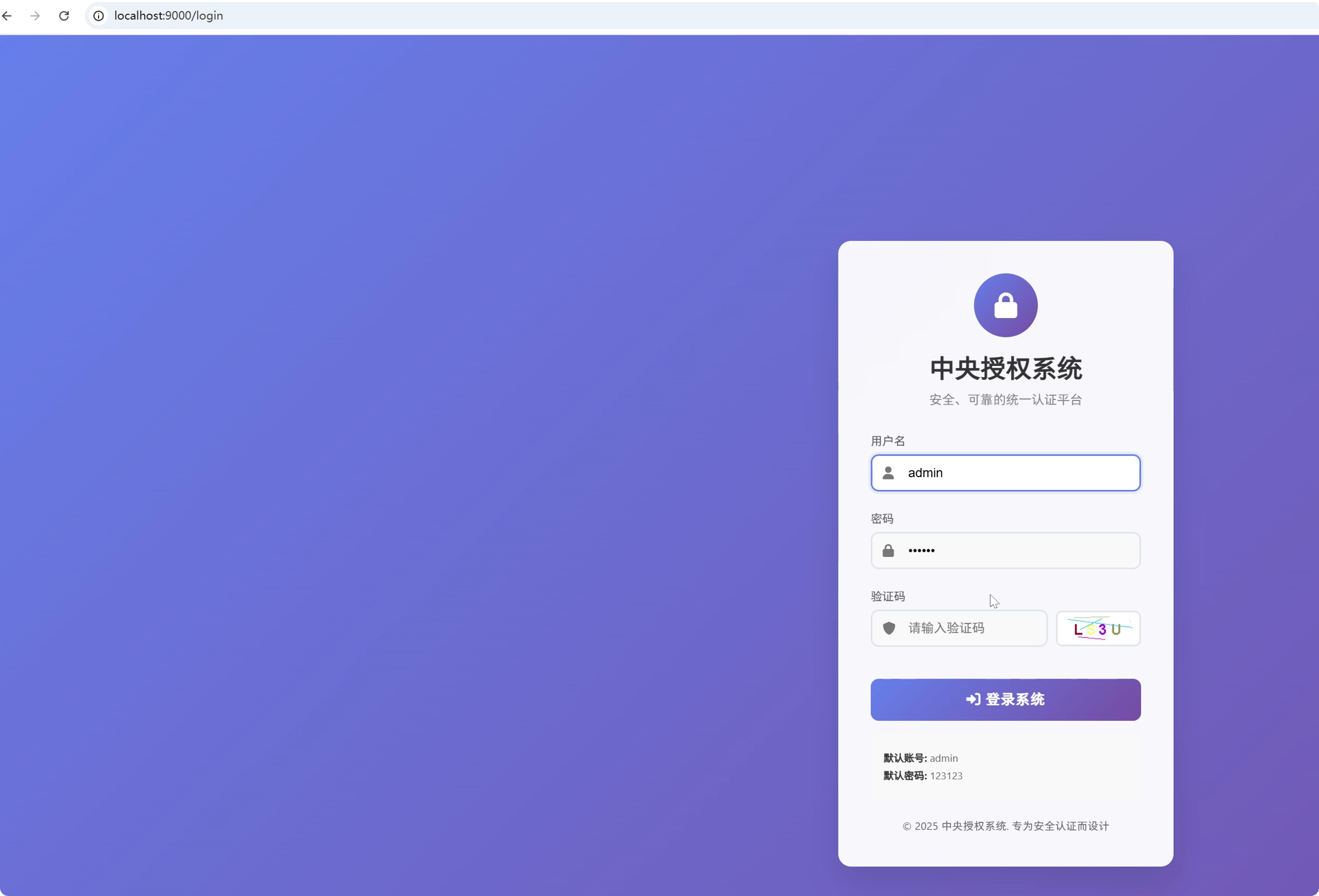
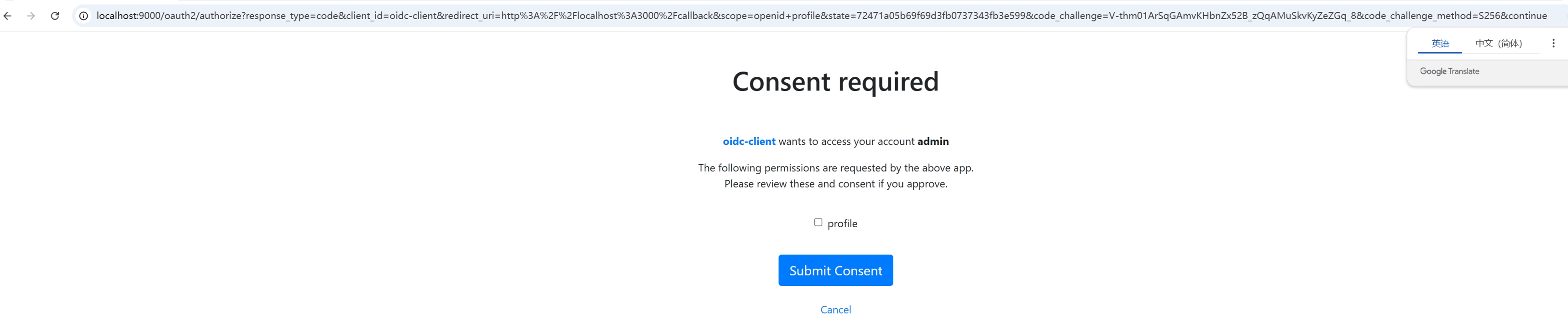
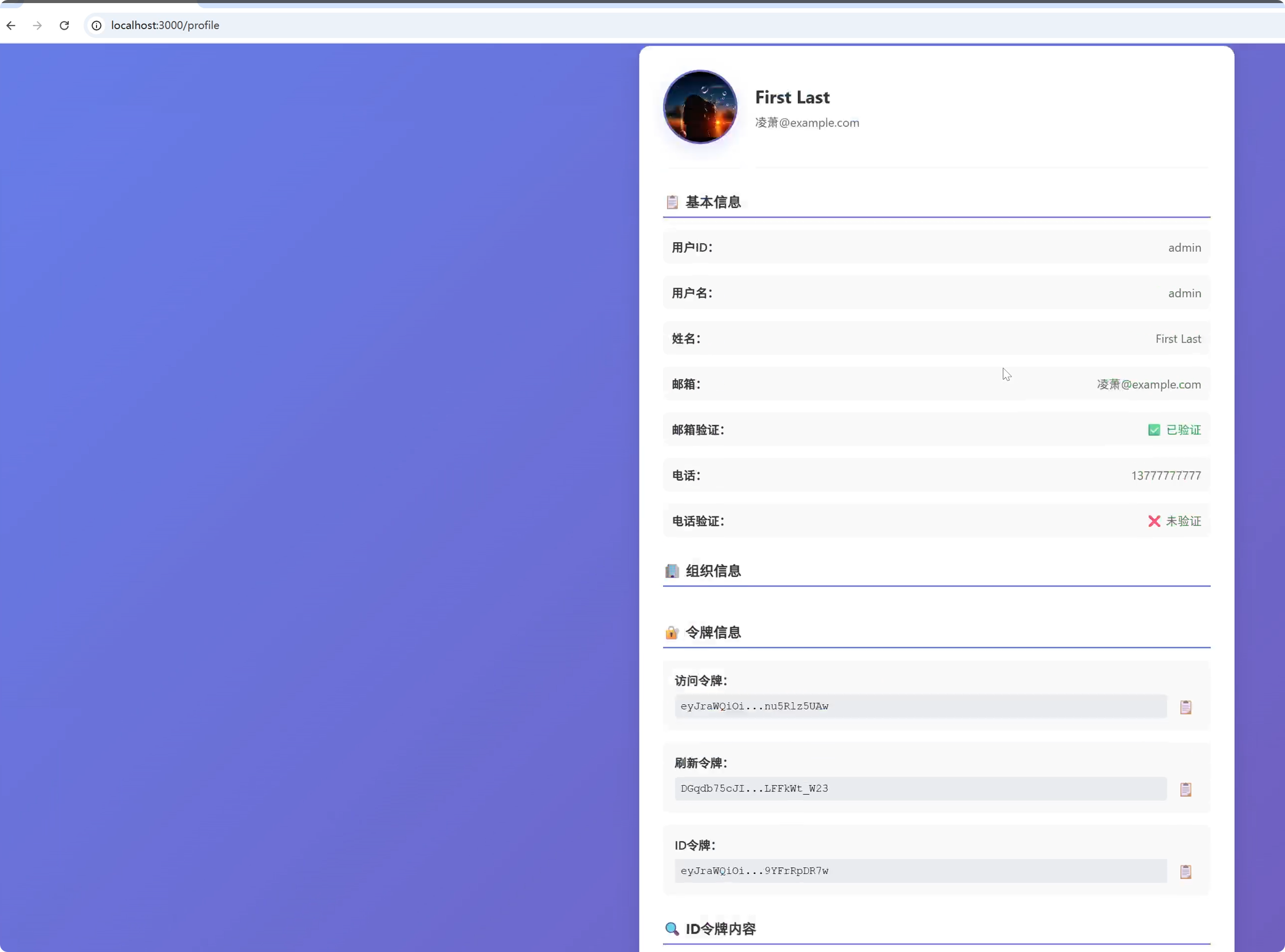
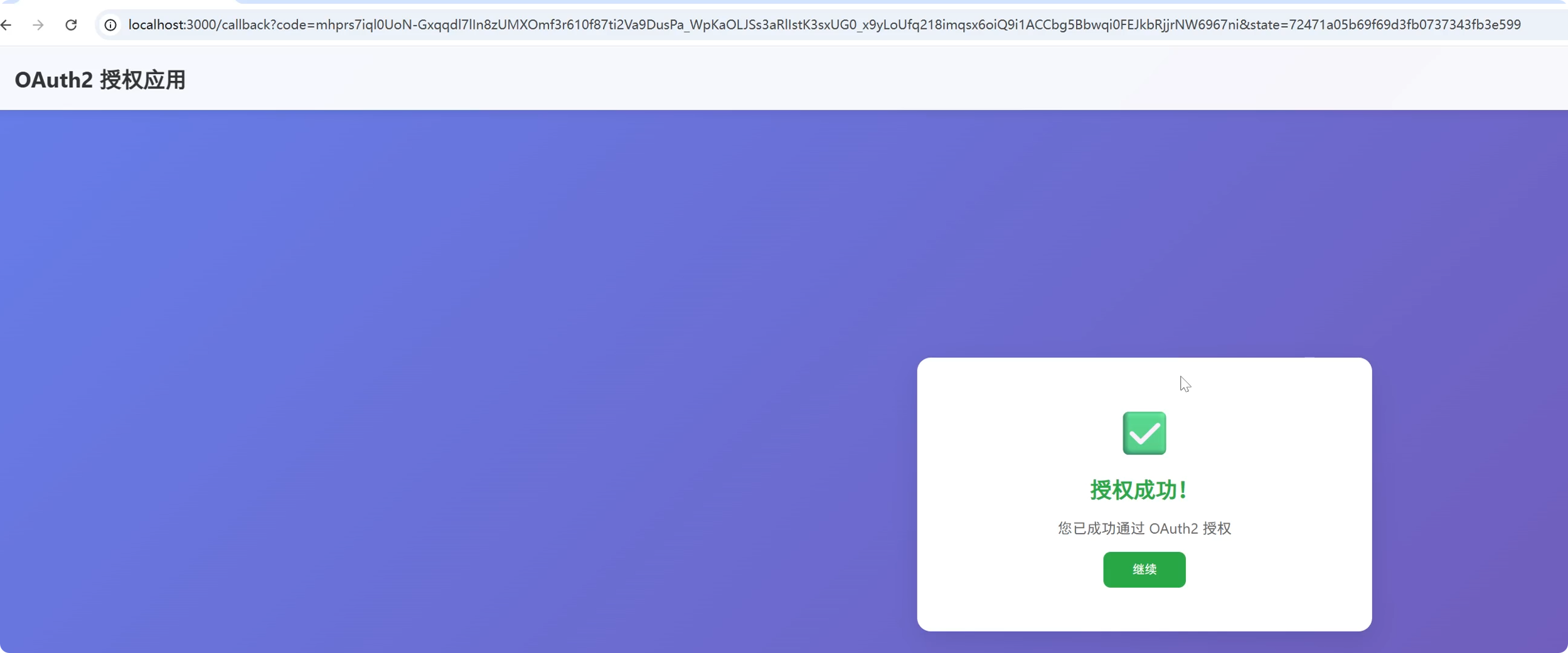
为什么使用Spring boot4
使用 Spring Boot 4(正式发布于 2025 年 11 月)是 Java 开发迈向云原生、高性能与现代化架构的重要一步。相比早期版本(如 Spring Boot 2.x/3.x),Spring Boot 4 不仅是一次常规升级,更是一场架构范式跃迁。以下是使用 Spring Boot 4 的核心原因:
性能革命:高并发 + 极速启动
- 原生支持 JDK 21 虚拟线程
RPS 从 1.2 万 → 8.5 万+
CPU 占用下降 40%
百万级并发连接轻松应对 - GraalVM 原生镜像生产级支持
冷启动时间:500ms → 50ms(↓90%)
内存占用:2GB → 120MB(↓80%)
完美适配 Serverless、Kubernetes、FaaS 场景
通过 @NativeHint 精准控制反射与资源加载 - 声明式 HTTP 客户端 @HttpExchange,替代 Feign,代码量减少 60%
延迟从 15ms → 3ms
无缝集成 WebFlux - RestTestClient
测试 REST 接口更简单,无需响应式基础设施
支持 MockMvc 与真实服务器双模式 - 深度集成 Micrometer 2.0 + OpenTelemetry
实现 Metrics + Traces + Logs 三位一体
自动注入 TraceID,跨服务链路追踪效率 ↑60% - 内置 JWT 动态校验 & OAuth 2.1 快速集成
✅ 在 Kubernetes 或 Service Mesh 环境中“开箱即观测”,大幅降低 SRE 成本。 - 模块化架构 & 更强扩展性
代码库彻底模块化
自动配置、Starter、AOT 支持拆分为独立小模块
减少类路径扫描负担,提升原生镜像构建效率,新增 @ConfigurationPropertiesSource
解决跨模块配置元数据缺失问题
提升大型项目配置管理可靠性
等一些新的特性,对比Spring boot3启动速度更快,支持并发更高,深度集成微服务相关的模块与维护,目前还刚发布不久,可以测试。但是不推荐生产,推荐现有的Spring boo3.5稳定版
为什么使用OAuth2.1 + OpenID Connect(OIDC)
使用 OAuth 2.1 + OpenID Connect(OIDC) 是现代应用实现安全、标准化、可扩展的身份认证与授权的黄金组合。虽然 OAuth 2.0 本身只解决“授权”问题,但结合 OIDC 后,它就完整覆盖了“你是谁?你能做什么?”这两个核心安全命题。
OAuth 2.1 并未在 IETF 正式发布为 RFC(截至 2025 年仍为草案),但已被主流厂商(Google、Auth0、Spring Security 等)广泛采纳。其本质是将 OAuth 2.0 中已被证明不安全或过时的部分移除,并整合最佳实践(如 PKCE)作为强制要求。
主要变化(对比 OAuth 2.0):
| 特性 | OAuth 2.0 | OAuth 2.1 |
|---|---|---|
| 隐式授权模式(Implicit Flow) | ✅ 支持(但不安全) | ❌ 彻底移除 |
| 密码模式(Resource Owner Password Credentials) | ✅ 支持 | ❌ 弃用/移除 |
| PKCE(Proof Key for Code Exchange) | 可选(推荐用于公共客户端) | ✅ 所有授权码流程强制启用 |
| 重定向 URI 必须完全匹配 | 部分实现宽松 | ✅ 严格校验(防止开放重定向攻击) |
| Refresh Token 安全 | 无统一规范 | ✅ 建议绑定客户端、一次性使用、轮换机制 |
为什么 OAuth 2.1 + OIDC 是黄金组合?
| 能力 | OAuth 2.1 贡献 | OIDC 贡献 |
|---|---|---|
| 身份认证(Authentication) | ❌ 不提供 | ✅ 通过 id_token(JWT)证明用户身份 |
| 资源授权(Authorization) | ✅ 提供 access_token | ✅ 复用 OAuth 2.1 的授权流程 |
| 单点登录(SSO) | ❌ 无法实现 | ✅ 标准化 SSO 流程(如 prompt=none) |
| 移动端/SPA 安全 | ✅ 强制 PKCE 防拦截 | ✅ 适配无后端的前端应用 |
| 企业集成 | ✅ 标准化授权 | ✅ 支持企业 IdP(如 Azure AD, Okta) |
- 彻底消除高危授权模式
- 隐式模式(Implicit) 曾被 SPA 广泛使用,但因 Token 暴露在 URL(可能被日志、Referer 泄露)而被废弃。
- 密码模式 让客户端直接接触用户密码,违反最小权限原则。
🛑 OAuth 2.1 只保留最安全的授权码模式(Authorization Code Flow),并强制 PKCE,适用于 Web、移动端、桌面应用。
-
✅ PKCE 成为标配,保护公共客户端
即使没有client_secret(如浏览器、手机 App),也能防止授权码被中间人截获后冒用 -
标准化身份信息传递(ID Token)
OIDC 的id_token是一个签名 JWT,包含标准声明:
{
  "iss": "https://idp.example.com",
  "sub": "user-12345",          // 全局唯一用户ID
  "aud": "my-app-client-id",
  "exp": 1735689600,
  "iat": 1735686000,
  "email": "alice@company.com",
  "email_verified": true,
  "name": "Alice Smith",
  "picture": "https://...",
  "groups": ["admin", "finance"]
}
代码
maven配置
pom.xml
 <?xml version="1.0" encoding="UTF-8"?>
<project xmlns="http://maven.apache.org/POM/4.0.0" xmlns:xsi="http://www.w3.org/2001/XMLSchema-instance"
         xsi:schemaLocation="http://maven.apache.org/POM/4.0.0 https://maven.apache.org/xsd/maven-4.0.0.xsd">
    <modelVersion>4.0.0</modelVersion>
    <parent>
        <groupId>org.springframework.boot</groupId>
        <artifactId>spring-boot-starter-parent</artifactId>
        <version>4.0.1</version>
        <relativePath/> <!-- lookup parent from repository -->
    </parent>
    <groupId>com.example</groupId>
    <artifactId>springboot4</artifactId>
    <version>0.0.1-SNAPSHOT</version>
    <name>springboot4</name>
    <description>springboot4</description>
    <url/>
    <properties>
        <java.version>25</java.version>
        <maven.compiler.source>25</maven.compiler.source>
        <maven.compiler.target>25</maven.compiler.target>
    </properties>
    <dependencies>
        <dependency>
            <groupId>org.springframework.boot</groupId>
            <artifactId>spring-boot-starter-web</artifactId>
        </dependency>

        <dependency>
            <groupId>org.springframework.boot</groupId>
            <artifactId>spring-boot-starter-thymeleaf</artifactId>
        </dependency>

        <dependency>
            <groupId>org.projectlombok</groupId>
            <artifactId>lombok</artifactId>
            <optional>true</optional>
        </dependency>
        <dependency>
            <groupId>org.springframework.boot</groupId>
            <artifactId>spring-boot-starter-oauth2-authorization-server</artifactId>
        </dependency>
        <dependency>
            <groupId>org.springframework.boot</groupId>
            <artifactId>spring-boot-starter-test</artifactId>
            <scope>test</scope>
        </dependency>

        <dependency>
            <groupId>org.springframework.boot</groupId>
            <artifactId>spring-boot-starter-data-redis</artifactId>
        </dependency>
        <dependency>
            <groupId>org.springframework.boot</groupId>
            <artifactId>spring-boot-starter-session-data-redis</artifactId>
        </dependency>
        <dependency>
            <groupId>com.mysql</groupId>
            <artifactId>mysql-connector-j</artifactId>
            <scope>runtime</scope>
        </dependency>
        <dependency>
            <groupId>org.springframework.boot</groupId>
            <artifactId>spring-boot-starter-data-jdbc</artifactId>
        </dependency>
    </dependencies>

    <build>
        <plugins>
            <plugin>
                <groupId>org.apache.maven.plugins</groupId>
                <artifactId>maven-compiler-plugin</artifactId>
                <configuration>
                    <source>25</source>
                    <target>25</target>
                    <annotationProcessorPaths>
                        <path>
                            <groupId>org.projectlombok</groupId>
                            <artifactId>lombok</artifactId>
                        </path>
                    </annotationProcessorPaths>
                </configuration>
            </plugin>
            <plugin>
                <groupId>org.graalvm.buildtools</groupId>
                <artifactId>native-maven-plugin</artifactId>
            </plugin>
            <plugin>
                <groupId>org.springframework.boot</groupId>
                <artifactId>spring-boot-maven-plugin</artifactId>
                <configuration>
                    <excludes>
                        <exclude>
                            <groupId>org.projectlombok</groupId>
                            <artifactId>lombok</artifactId>
                        </exclude>
                    </excludes>
                </configuration>
            </plugin>
        </plugins>
    </build>

</project>
配置文件
logging:
  level:
    org.springframework.security: trace #开启日志,观察OAuth操作

server:
  port: 9000

spring:
  threads:
    virtual:
      enabled: true #开启虚拟线程,提高性能
  datasource:
    driver-class-name: com.mysql.cj.jdbc.Driver
    url:
    username:
    password:
    hikari:
      minimum-idle: 3
      maximum-pool-size: 10000
      max-lifetime: 300000
      connection-test-query: SELECT 1
      connection-timeout: 30000
  data:
    redis:
      port:
      database: 1
      host:
      password:
      lettuce:
        pool:
          max-active: 20
          max-idle: 10
          min-idle: 2
          max-wait: 2000ms
      timeout: 2000ms
      connect-timeout: 2000ms

  #Spring默认的表结构,执行一次后,最好关闭,或者手动创建
  sql:
    init:
      mode: always
      schema-locations:
        - classpath:org/springframework/security/oauth2/server/authorization/client/oauth2-registered-client-schema.sql
      continue-on-error: true #开发模式下开启
OAuth配置
@Configuration
@EnableWebSecurity
public class SecurityConfig {

    @Bean
    @Order(1)
    public SecurityFilterChain authorizationServerSecurityFilterChain(HttpSecurity http) {
        OAuth2AuthorizationServerConfigurer authorizationServerConfigurer = new OAuth2AuthorizationServerConfigurer();
//        authorizationServerConfigurer.authorizationEndpoint(authorizationEndpoint ->
//                authorizationEndpoint.consentPage("/oauth2/consent")); // 自定义授权页面
        http
                .securityMatcher(authorizationServerConfigurer.getEndpointsMatcher())
                .with(authorizationServerConfigurer, (authorizationServer) ->
                        authorizationServer
                                .oidc(oidc -> oidc
                                        .userInfoEndpoint(userInfo -> userInfo
                                                .userInfoMapper(userInfoMapper())))
                )
                .authorizeHttpRequests((authorize) ->
                        authorize.anyRequest().authenticated()
                )
                .exceptionHandling((exceptions) -> exceptions
                        .defaultAuthenticationEntryPointFor(
                                new LoginUrlAuthenticationEntryPoint("/login"),
                                new MediaTypeRequestMatcher(MediaType.TEXT_HTML)
                        )
                )
                // 配置CORS
                .cors(cors -> cors.configurationSource(corsConfigurationSource()))
                .csrf(csrf -> csrf.ignoringRequestMatchers(authorizationServerConfigurer.getEndpointsMatcher()));

        return http.build();
    }

    @Bean
    @Order(2)
    public SecurityFilterChain defaultSecurityFilterChain(HttpSecurity http) {
        http
                .authorizeHttpRequests((authorize) -> authorize
                        .requestMatchers("/login", "/css/**", "/js/**", "/images/**", "/captcha/**").permitAll()
                        .anyRequest().authenticated()
                )
                .addFilterBefore(new CaptchaAuthenticationFilter(), UsernamePasswordAuthenticationFilter.class) // 添加验证码过滤器,不用可以注释
                .formLogin(form -> form
                        .loginPage("/login")
                        .permitAll()
                )
                .logout(LogoutConfigurer::permitAll)
                .cors(cors -> cors.configurationSource(corsConfigurationSource()));// 配置CORS

        return http.build();
    }

    // CORS配置源
    @Bean
    CorsConfigurationSource corsConfigurationSource() {
        CorsConfiguration configuration = new CorsConfiguration();
        configuration.setAllowedOriginPatterns(List.of("*"));
        configuration.setAllowedMethods(List.of("*"));
        configuration.setAllowedHeaders(List.of("*"));
        configuration.setAllowCredentials(true);
        configuration.setMaxAge(3600L);
        UrlBasedCorsConfigurationSource source = new UrlBasedCorsConfigurationSource();
        source.registerCorsConfiguration("/**", configuration);
        return source;
    }

    @Bean
    public UserDetailsService userDetailsService() {
        return new MyUserDetails();
    }

    //使用JDBC存储Client信息,支持动态存储
    @Bean
    public RegisteredClientRepository registeredClientRepository(JdbcTemplate jdbcTemplate) {
        RegisteredClient oidcClient = RegisteredClient.withId("7e2d5d5e-0077-4853-97a8-4e49be099956")
                .clientId("oidc-client")
                .clientSecret("{noop}secret")
                .clientAuthenticationMethod(ClientAuthenticationMethod.CLIENT_SECRET_BASIC)
                .authorizationGrantType(AuthorizationGrantType.AUTHORIZATION_CODE)
                .authorizationGrantType(AuthorizationGrantType.REFRESH_TOKEN)
                .redirectUri("http://localhost:3000/callback")
                .redirectUri("https://baidu.com")
                .postLogoutRedirectUri("http://localhost:9000/")
                .scope(OidcScopes.OPENID)
                .scope(OidcScopes.PROFILE)
                .scope(OidcScopes.EMAIL)
                .scope(OidcScopes.ADDRESS)
                .scope(OidcScopes.PHONE)
                .clientSettings(ClientSettings.builder()
                        .requireAuthorizationConsent(true) // 启用授权同意页面
                        .requireProofKey(true)  // 开启PKCE
                        .build())
                .build();
        JdbcRegisteredClientRepository registeredClientRepository = new JdbcRegisteredClientRepository(jdbcTemplate);

        registeredClientRepository.save(oidcClient);  //添加一条clinet,也可以在数据库中手动添加
        return registeredClientRepository;
    }

     // 使用Redis存储手动授权信息
    @Bean
    public OAuth2AuthorizationConsentService authorizationConsentService(
            RedisTemplate<String, Object> redisTemplate, RegisteredClientRepository registeredClientRepository) {
        return new RedisOAuth2AuthorizationConsentService(redisTemplate, registeredClientRepository);
    }

    // 使用Redis存储授权后的信息
    @Bean
    public OAuth2AuthorizationService authorizationService(
            RedisTemplate<String, Object> redisTemplate,
            RegisteredClientRepository registeredClientRepository) {
        return new RedisOAuth2AuthorizationService(redisTemplate, registeredClientRepository);
    }

    //使用默认地址映射
    @Bean
    public AuthorizationServerSettings authorizationServerSettings() {
        return AuthorizationServerSettings.builder().build();
    }

    @Bean
    // 自定义ID_TOKEN信息
    public OAuth2TokenCustomizer<JwtEncodingContext> tokenCustomizer(
            UserDetailsService userInfoService) {
        return (context) -> {
            if (OidcParameterNames.ID_TOKEN.equals(context.getTokenType().getValue())) {
                UserDetails userDetails = userInfoService.loadUserByUsername(context.getPrincipal().getName());
                context.getClaims().claims(claims -> {
//                    claims.clear();
                    if (userDetails instanceof Users customUser) {
                        claims.put("nickname", customUser.getNickname());
                        claims.put("avatar", customUser.getAvatar());
                        claims.put("phone", customUser.getPhone());
                        claims.put("email", customUser.getEmail());
                    }
                });
            }
        };
    }

    // 自定义用户信息映射
    @Bean
    public Function<OidcUserInfoAuthenticationContext, OidcUserInfo> userInfoMapper() {
        return (context -> {
            // 获取认证信息
            Authentication authentication = context.getAuthentication();
            try {
                String username = authentication.getName();

                UserDetails userDetails = userDetailsService().loadUserByUsername(username);

                // 如果是自定义的Users类型,返回自定义的用户信息,否则返回默认的用户信息
                if (userDetails instanceof Users customUser) {
                    return new OidcUserInfo(customUser.getOidcUserInfo());
                }
            } catch (Exception _) {

            }
            JwtAuthenticationToken principal = (JwtAuthenticationToken) authentication.getPrincipal();
            return new OidcUserInfo(principal.getToken().getClaims());

        });
    }

    private static KeyPair generateRsaKey() {
        // 尝试从本地文件加载密钥对
        try {
            java.security.PrivateKey privateKey = RsaKeyLoader.loadPrivateKey("keys/oauth2-private.key");
            java.security.PublicKey publicKey = RsaKeyLoader.loadPublicKey("keys/oauth2-public.key");
            System.out.println("成功从文件加载RSA密钥对");
            return new KeyPair(publicKey, privateKey);
        } catch (Exception ex) {
            // 如果加载失败,则生成新的密钥对
            System.err.println("警告:无法从文件加载密钥对,将生成临时密钥对: " + ex.getMessage());
            KeyPair keyPair;
            try {
                KeyPairGenerator keyPairGenerator = KeyPairGenerator.getInstance("RSA");
                keyPairGenerator.initialize(2048);
                keyPair = keyPairGenerator.generateKeyPair();
                System.out.println("已生成新的临时RSA密钥对");
            } catch (Exception ex2) {
                throw new IllegalStateException(ex2);
            }
            return keyPair;
        }
    }

    @Bean
    public JWKSource<SecurityContext> jwkSource() {
        KeyPair keyPair = generateRsaKey();
        RSAPublicKey publicKey = (RSAPublicKey) keyPair.getPublic();
        RSAPrivateKey privateKey = (RSAPrivateKey) keyPair.getPrivate();
        RSAKey rsaKey = new RSAKey.Builder(publicKey)
                .privateKey(privateKey)
                .keyID("oauth2-jwk-key")
                .build();
        JWKSet jwkSet = new JWKSet(rsaKey);
        return new ImmutableJWKSet<>(jwkSet);
    }

    @Bean
    public JwtDecoder jwtDecoder(JWKSource<SecurityContext> jwkSource) {
        return OAuth2AuthorizationServerConfiguration.jwtDecoder(jwkSource);
    }
}
Redis配置,RedisConfig
@Configuration(proxyBeanMethods = false)
public class RedisConfig {

    @Bean
    public RedisTemplate<String, Object> redisTemplate(RedisConnectionFactory redisConnectionFactory) {
        RedisTemplate<String, Object> redisTemplate = new RedisTemplate<>();
        redisTemplate.setConnectionFactory(redisConnectionFactory);
        // 设置key的序列化方式为String
        redisTemplate.setKeySerializer(new StringRedisSerializer());
        redisTemplate.setHashKeySerializer(new StringRedisSerializer());
        // 设置value的序列化方式为JSON
        return redisTemplate;
    }
}
自定义UserDetailsService
public class MyUserDetails implements UserDetailsService {

    private final PasswordEncoder passwordEncoder = PasswordEncoderFactories.createDelegatingPasswordEncoder();

//    //使用Spring默认User管理
//    JdbcUserDetailsManager jdbcUserDetailsManager = new JdbcUserDetailsManager();

    @Override
    public @Nullable UserDetails loadUserByUsername(String username) throws UsernameNotFoundException {
        // 模拟数据库
        if ("admin".equals(username)) {
            return new Users("admin", passwordEncoder.encode("123123"),
                    Users.withUsername("admin").password(passwordEncoder.encode("123123")).roles("USER").build().getAuthorities(),
                    "凌萧", "https://example.com/1.png", "13777777777");
        }
        return null;
    }
}
自定义User
@EqualsAndHashCode(callSuper = true)
@Data
// 自定义用户信息
public class Users extends User {
    public String nickname;
    private String email;
    private String phone;
    private String avatar;

    public Users(String username, @Nullable String password, Collection<? extends GrantedAuthority> authorities, String nickname, String avatar, String phone) {
        super(username, password, authorities);
        this.nickname = nickname;
        this.avatar = avatar;
        this.phone = phone;
    }

    public Map<String, Object> getOidcUserInfo() {
        return OidcUserInfo.builder()
                .subject(getUsername())
                .name("First Last")
                .givenName("First")
                .familyName("Last")
                .middleName("Middle")
                .nickname(nickname)
                .preferredUsername(getUsername())
                .profile("https://example.com/" + nickname)
                .picture(avatar)
                .website("https://example.com")
                .email(nickname + "@example.com")
                .emailVerified(true)
                .gender("female")
                .birthdate("1970-01-01")
                .zoneinfo("Europe/Paris")
                .locale("en-US")
                .phoneNumber(phone)
                .phoneNumberVerified(false)
                .claim("address", Collections.singletonMap("formatted", "Champ de Mars\n5 Av. Anatole France\n75007 Paris\nFrance"))
                .updatedAt("1970-01-01T00:00:00Z")
                .build()
                .getClaims();
    }
}
自定义Redis 授权同意服务
public class RedisOAuth2AuthorizationConsentService implements OAuth2AuthorizationConsentService {

    private static final String CONSENT_KEY_PREFIX = "consent:";
    // 可选:设置授权时间,授权时间内不需要手动点击授权按钮(例如 30 天)
    private static final long CONSENT_EXPIRE_DAYS = 30;

    private final RedisTemplate<String, Object> redisTemplate;
    private final RegisteredClientRepository registeredClientRepository; // ← 新增

    public RedisOAuth2AuthorizationConsentService(RedisTemplate<String, Object> redisTemplate, RegisteredClientRepository registeredClientRepository) {
        this.redisTemplate = redisTemplate;
        this.registeredClientRepository = registeredClientRepository;

    }

    @Override
    public void save(OAuth2AuthorizationConsent authorizationConsent) {
        if (authorizationConsent == null) {
            return;
        }
        String key = getConsentKey(authorizationConsent.getRegisteredClientId(), authorizationConsent.getPrincipalName());
        redisTemplate.opsForValue().set(key, authorizationConsent, CONSENT_EXPIRE_DAYS, TimeUnit.DAYS);
    }

    @Override
    public void remove(OAuth2AuthorizationConsent authorizationConsent) {
        if (authorizationConsent == null) {
            return;
        }
        String key = getConsentKey(authorizationConsent.getRegisteredClientId(), authorizationConsent.getPrincipalName());
        redisTemplate.delete(key);
    }

    @Override
    public OAuth2AuthorizationConsent findById(String registeredClientId, String principalName) {
        RegisteredClient registeredClient = registeredClientRepository.findById(registeredClientId);
        if (registeredClient == null) {
            // 客户端不存在,即使 Redis 里有 consent 也视为无效
            return null;
        }
        String key = getConsentKey(registeredClientId, principalName);
        return (OAuth2AuthorizationConsent) redisTemplate.opsForValue().get(key);
    }

    private static String getConsentKey(String registeredClientId, String principalName) {
        return CONSENT_KEY_PREFIX + principalName + ":" + registeredClientId;
    }
}
Redis 自定义存储授权信息
// Redis 自定义存储授权信息
package com.example.springboot4.service;

import org.slf4j.Logger;
import org.slf4j.LoggerFactory;
import org.springframework.dao.DataAccessException;
import org.springframework.data.redis.core.RedisTemplate;
import org.springframework.security.oauth2.core.AuthorizationGrantType;
import org.springframework.security.oauth2.server.authorization.OAuth2Authorization;
import org.springframework.security.oauth2.server.authorization.OAuth2AuthorizationCode;
import org.springframework.security.oauth2.server.authorization.OAuth2AuthorizationService;
import org.springframework.security.oauth2.server.authorization.OAuth2TokenType;
import org.springframework.security.oauth2.server.authorization.client.RegisteredClientRepository;

import java.time.Duration;

// RedisOAuth2AuthorizationService.java
// Redis 自定义存储授权信息
public class RedisOAuth2AuthorizationService implements OAuth2AuthorizationService {

    private static final Logger logger = LoggerFactory.getLogger(RedisOAuth2AuthorizationService.class);

    private final RedisTemplate<String, Object> redisTemplate;
    private final RegisteredClientRepository registeredClientRepository;
    private final Duration ttl = Duration.ofHours(30); // 根据token过期时间调整

    public RedisOAuth2AuthorizationService(RedisTemplate<String, Object> redisTemplate,
                                           RegisteredClientRepository registeredClientRepository) {
        this.redisTemplate = redisTemplate;
        this.registeredClientRepository = registeredClientRepository;
    }

    @Override
    public void save(OAuth2Authorization authorization) {
        try {
            String key = "oauth2:authorization:" + authorization.getId();
            redisTemplate.opsForValue().set(key, authorization, ttl);
            // 同时按token值存储索引
            if (authorization.getAccessToken() != null) {
                String tokenKey = "oauth2:token:" + authorization.getAccessToken().getToken().getTokenValue();
                redisTemplate.opsForValue().set(tokenKey, authorization.getId(), ttl);
            }

            if (authorization.getRefreshToken() != null) {
                String refreshTokenKey = "oauth2:refresh:" + authorization.getRefreshToken().getToken().getTokenValue();
                redisTemplate.opsForValue().set(refreshTokenKey, authorization.getId(), ttl);
            }

            // 添加对授权码的支持
            if (authorization.getAuthorizationGrantType().getValue().equals(AuthorizationGrantType.AUTHORIZATION_CODE.getValue())) {
                OAuth2Authorization.Token<OAuth2AuthorizationCode> authorizationCode =
                        authorization.getToken(OAuth2AuthorizationCode.class);
                if (authorizationCode != null) {
                    String codeKey = "oauth2:code:" + authorizationCode.getToken().getTokenValue();
                    redisTemplate.opsForValue().set(codeKey, authorization.getId(), ttl);
                } else {
                    //第一次授权,需要用户手动点击授权按钮,根据state存储,用于后续验证
                    String stateKey = "oauth2:state:" + authorization.getAttribute("state");
                    redisTemplate.opsForValue().set(stateKey, authorization.getId(), ttl);
                }
            }
        } catch (DataAccessException e) {
            logger.error("保存OAuth2授权信息到Redis时发生错误", e);
            throw e;
        }
    }

    @Override
    public void remove(OAuth2Authorization authorization) {
        try {
            String key = "oauth2:authorization:" + authorization.getId();
            redisTemplate.delete(key);
            if (authorization.getAccessToken() != null) {
                String tokenKey = "oauth2:token:" + authorization.getAccessToken().getToken().getTokenValue();
                redisTemplate.delete(tokenKey);
            }
            if (authorization.getRefreshToken() != null) {
                String refreshTokenKey = "oauth2:refresh:" + authorization.getRefreshToken().getToken().getTokenValue();
                redisTemplate.delete(refreshTokenKey);
            }
        } catch (DataAccessException e) {
            logger.error("从Redis删除OAuth2授权信息时发生错误", e);
            throw e;
        }
    }

    @Override
    public OAuth2Authorization findById(String id) {
        try {
            String key = "oauth2:authorization:" + id;
            return (OAuth2Authorization) redisTemplate.opsForValue().get(key);
        } catch (DataAccessException e) {
            logger.error("从Redis查询OAuth2授权信息时发生错误", e);
            throw e;
        }
    }

    @Override
    public OAuth2Authorization findByToken(String token, OAuth2TokenType tokenType) {
        try {
            String tokenKey = getTokenKey(token, tokenType);
            String authId = (String) redisTemplate.opsForValue().get(tokenKey);
            return findById(authId);
        } catch (DataAccessException e) {
            logger.error("根据Token从Redis查询OAuth2授权信息时发生错误", e);
            throw e;
        }
    }

    private String getTokenKey(String token, OAuth2TokenType tokenType) {
        if (OAuth2TokenType.ACCESS_TOKEN.equals(tokenType)) {
            return "oauth2:token:" + token;
        } else if (OAuth2TokenType.REFRESH_TOKEN.equals(tokenType)) {
            return "oauth2:refresh:" + token;
        } else if (tokenType.getValue().equals("code")) {
            return "oauth2:code:" + token;
        } else if (tokenType.getValue().equals("state")) {
            //手动授权之后,返回认证信息
            return "oauth2:state:" + token;
        }
        return "oauth2:token:" + token;
    }
}
RSA密钥加载器
public class RsaKeyLoader {

    /**
     * 从指定路径加载私钥
     *
     * @param privateKeyPath 私钥文件路径
     * @return PrivateKey 私钥对象
     * @throws IOException            IO异常
     * @throws ClassNotFoundException 类未找到异常
     */
    public static PrivateKey loadPrivateKey(String privateKeyPath) throws IOException, ClassNotFoundException {
        try (ObjectInputStream ois = new ObjectInputStream(Files.newInputStream(Path.of(privateKeyPath)))) {
            return (PrivateKey) ois.readObject();
        }
    }

    /**
     * 从指定路径加载公钥
     *
     * @param publicKeyPath 公钥文件路径
     * @return PublicKey 公钥对象
     * @throws IOException            IO异常
     * @throws ClassNotFoundException 类未找到异常
     */
    public static PublicKey loadPublicKey(String publicKeyPath) throws IOException, ClassNotFoundException {
        try (ObjectInputStream ois = new ObjectInputStream(Files.newInputStream(Path.of(publicKeyPath)))) {
            return (PublicKey) ois.readObject();
        }
    }
}
自定义登录界面
@Controller
public class LoginController {

    @GetMapping("/")
    @ResponseBody
    public String home() {
        return "登录成功";
    }

    @GetMapping("/login")
    public String login(@RequestParam(defaultValue = "false") boolean error,
                        @RequestParam(defaultValue = "false") boolean logout) {
        return "login";
    }

}
验证码
@RestController
@RequestMapping("/captcha")
public class CaptchaController {
    /**
     * 生成验证码
     */
    @GetMapping("/generate")
    public Map<String, String> generateCaptcha(HttpSession session) {

        CaptchaUtil.Captcha captcha = CaptchaUtil.generateCaptcha();
        // 将验证码文本存储在session中,也可以自定义Redis存储验证码
        session.setAttribute("captcha", captcha.getText());

        // 返回验证码图片Base64编码
        Map<String, String> response = new HashMap<>();
        response.put("image", "data:image/png;base64," + captcha.getImageBase64());
        return response;
    }
}
验证码生成
public class CaptchaUtil {

    private static final char[] CHARS = {'2', '3', '4', '5', '6', '7', '8', '9',
                                         'A', 'B', 'C', 'D', 'E', 'F', 'G', 'H', 'J', 'K', 'L', 'M',
                                         'N', 'P', 'Q', 'R', 'S', 'T', 'U', 'V', 'W', 'X', 'Y', 'Z'};

    private static final int SIZE = 4;
    private static final int LINES = 5;
    private static final int WIDTH = 120;
    private static final int HEIGHT = 40;

    /**
     * 生成验证码图片和文本
     */
    public static Captcha generateCaptcha() {
        BufferedImage image = new BufferedImage(WIDTH, HEIGHT, BufferedImage.TYPE_INT_RGB);
        Graphics g = image.getGraphics();

        // 设置背景色
        g.setColor(Color.WHITE);
        g.fillRect(0, 0, WIDTH, HEIGHT);

        // 生成随机验证码
        Random random = new Random();
        StringBuilder captchaText = new StringBuilder();
        for (int i = 0; i < SIZE; i++) {
            char c = CHARS[random.nextInt(CHARS.length)];
            captchaText.append(c);
        }

        // 绘制验证码文本
        // 使用系统默认字体替代指定字体
        // g.setFont(new Font("Arial", Font.BOLD, 24));
        Font font = new Font(null, Font.BOLD, 24);
        g.setFont(font);

        for (int i = 0; i < captchaText.length(); i++) {
            g.setColor(getRandomColor());
            g.drawString(String.valueOf(captchaText.charAt(i)), 20 + i * 20, 30);
        }

        // 绘制干扰线
        for (int i = 0; i < LINES; i++) {
            g.setColor(getRandomColor());
            int x1 = random.nextInt(WIDTH);
            int y1 = random.nextInt(HEIGHT);
            int x2 = random.nextInt(WIDTH);
            int y2 = random.nextInt(HEIGHT);
            g.drawLine(x1, y1, x2, y2);
        }

        g.dispose();

        // 将图片转换为Base64编码
        String base64Image = imageToBase64(image);

        return new Captcha(captchaText.toString(), base64Image);
    }

    /**
     * 获取随机颜色
     */
    private static Color getRandomColor() {
        Random random = new Random();
        return new Color(random.nextInt(256), random.nextInt(256), random.nextInt(256));
    }

    /**
     * 将BufferedImage转换为Base64编码
     */
    private static String imageToBase64(BufferedImage image) {
        try {
            ByteArrayOutputStream outputStream = new ByteArrayOutputStream();
            ImageIO.write(image, "png", outputStream);
            byte[] imageBytes = outputStream.toByteArray();
            return Base64.getEncoder().encodeToString(imageBytes);
        } catch (IOException e) {
            throw new RuntimeException("Failed to convert image to Base64", e);
        }
    }

    /**
     * 验证码数据类
     */
    public static class Captcha {
        private final String text;
        private final String imageBase64;

        public Captcha(String text, String imageBase64) {
            this.text = text;
            this.imageBase64 = imageBase64;
        }

        public String getText() {
            return text;
        }

        public String getImageBase64() {
            return imageBase64;
        }
    }
}
验证码过滤器
public class CaptchaAuthenticationFilter extends OncePerRequestFilter {

    private static final Logger logger = LoggerFactory.getLogger(CaptchaAuthenticationFilter.class);


    @Override
    protected void doFilterInternal(HttpServletRequest request,
                                    HttpServletResponse response,
                                    FilterChain filterChain) throws ServletException, IOException {


        // 只处理登录POST请求
        if (!shouldProcess(request)) {
            filterChain.doFilter(request, response);
            return;
        }


        // 获取用户输入的验证码
        String inputCaptcha = request.getParameter("captcha");

        // 获取Session中的验证码
        HttpSession session = request.getSession(false);
        String sessionCaptcha = (session != null) ? (String) session.getAttribute("captcha") : null;

        // 移除Session中的验证码,确保一次有效性
        if (session != null) {
            session.removeAttribute("captcha");
        }

        // 验证验证码
        if (inputCaptcha == null || !inputCaptcha.equalsIgnoreCase(sessionCaptcha)) {
            logger.warn("验证码验证失败. 用户输入: {}, Session中: {}", inputCaptcha, sessionCaptcha);
            // 验证码错误,重定向到登录页并携带错误参数
            response.sendRedirect("/login?captcha");
            return;
        }

        logger.info("验证码验证通过,继续执行认证流程");
        // 验证码正确,继续执行过滤器链
        filterChain.doFilter(request, response);
    }

    private boolean shouldProcess(HttpServletRequest request) {
        boolean matches = "/login".equals(request.getRequestURI()) &&
                "POST".equalsIgnoreCase(request.getMethod());
        logger.info("shouldProcess检查结果: {} | URI: {} | Method: {}",
                matches, request.getRequestURI(), request.getMethod());
        return matches;
    }
}
服务器端,使用Redis存储同意,授权信息,使用MySQL存储Clinet&pics=https://img.makesong.cn/20251225_234701.png&summary=)
服务器端,使用Redis存储同意,授权信息,使用MySQL存储Clinet&pics=https://img.makesong.cn/20251225_234701.png&desc=)
 微信
微信
 支付宝
支付宝